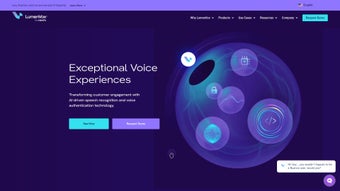

Download LumenVox – AI‑Powered Speech Recognition & Voice Authentication Tool
Overview
LumenVox is a next‑generation, AI‑driven speech recognition and voice authentication platform that enables businesses to transform how they engage with customers. By combining highly accurate speech‑to‑text conversion with robust voice‑based identity verification, LumenVox lets enterprises deliver personalized content, dynamic advertising, and frictionless support experiences across call centers, mobile apps, web portals, and IoT devices. The engine can handle everything from simple voice commands (“turn on lights”) to complex conversational queries (“what’s the status of my order placed last Tuesday?”), making it a versatile tool for a broad range of industries, including finance, healthcare, retail, and telecommunications.
What truly sets LumenVox apart is its flexible deployment model—on‑premises, in the cloud, or as a hybrid solution—allowing organizations to align the technology with existing security policies and infrastructure constraints. Moreover, the platform includes an adaptive global language model that supports multiple dialects and regional accents, while offering speech‑tuning capabilities that let developers fine‑tune accuracy for niche vocabularies or industry‑specific terminology. With a focus on rapid integration, LumenVox supplies comprehensive SDKs, RESTful APIs, and pre‑built connectors for popular CRM, ERP, and contact‑center suites, drastically shortening development timelines.
Continuous updates and a dedicated support team ensure that the system stays current with the latest AI advancements and regulatory requirements. In short, LumenVox is more than a speech engine—it’s a strategic asset that drives operational efficiency, boosts customer satisfaction, and opens new revenue streams through voice‑first interactions.
Core Features & Benefits
- Real‑time speech‑to‑text transcription with >95% accuracy in noisy environments.
- Multilingual support for over 30 languages and regional dialects.
- Voice authentication that verifies speaker identity in under 2 seconds.
- Adaptive language model that learns from domain‑specific vocabularies.
- Hybrid deployment options – on‑premises, cloud, or edge.
- Comprehensive SDKs for Java, .NET, Python, and JavaScript.
- RESTful API for easy integration with CRM, ERP, and custom applications.
- Built‑in analytics dashboard for monitoring usage, accuracy, and security events.
- Scalable architecture that supports millions of concurrent sessions.
- GDPR‑compliant data handling and end‑to‑end encryption.
Each of these features translates into tangible business benefits. The high‑precision transcription engine reduces the need for manual data entry, cutting operational costs and minimizing errors in call‑center logs. Multilingual capabilities open doors to global markets, allowing brands to serve customers in their native language without hiring additional staff.
Voice authentication not only speeds up identity verification but also strengthens security, protecting sensitive transactions from fraud. The adaptive language model ensures that industry‑specific jargon—whether it’s medical terminology for a health‑tech platform or financial acronyms for a banking app—is understood correctly, eliminating misunderstandings that could lead to costly compliance issues. Hybrid deployment gives IT teams the freedom to keep sensitive data on‑premises while leveraging the scalability of the cloud for peak loads, a crucial advantage for regulated sectors.
The SDKs and APIs are designed for rapid prototyping; developers can integrate speech functionality in a matter of hours rather than weeks, accelerating time‑to‑market for new voice‑enabled products. The analytics dashboard provides real‑time insights into usage patterns, enabling managers to fine‑tune the system, allocate resources efficiently, and demonstrate ROI to stakeholders. Finally, LumenVox’s commitment to security—through encryption, strict access controls, and GDPR compliance—helps organizations meet stringent data‑privacy regulations while delivering a seamless, secure voice experience to end users.
Installation, Usage & Compatibility
Step‑by‑Step Installation
Installing LumenVox is straightforward, regardless of the chosen deployment model. For a cloud‑first implementation, simply create an account on the LumenVox portal, select the desired subscription tier, and obtain your API credentials. The platform provides a one‑click Docker image that can be pulled from Docker Hub:
docker pull lumenvox/speech-engine:latest
docker run -d -p 8443:8443 -e LUMENVOX_KEY=YOUR_API_KEY lumenvox/speech-engine
On‑premises installations require a Windows Server 2019 or a Linux distribution (Ubuntu 20.04 LTS recommended). Download the installer package from the official website, run the setup wizard, and follow the prompts to configure database connections, SSL certificates, and network ports. The installer automatically checks system prerequisites—CPU, RAM, and storage—and suggests optimal configuration settings based on the expected load.
Getting Started with the SDKs
After the engine is up and running, developers can start building applications using the language‑specific SDKs. For example, a Java developer would add the Maven dependency:
  com.lumenvox
  speech-sdk
  2.3.1
Then instantiate a client, provide the API key, and start streaming audio:
SpeechClient client = new SpeechClient("YOUR_API_KEY");
client.transcribe(audioStream, result -> {
    System.out.println("Transcribed text: " + result.getText());
});
The same workflow applies to Python, .NET, and JavaScript, with sample code available in the documentation portal. LumenVox also offers a low‑code “Voice Builder” UI that lets non‑technical users design voice‑enabled flows using drag‑and‑drop components, perfect for marketing teams creating personalized IVR scripts or interactive ads.
Supported Operating Systems
- Windows 10, Windows Server 2019/2022
- macOS 11 (Big Sur) and later (via Docker or Virtual Machine)
- Ubuntu 20.04 LTS, Debian 11, CentOS 8
- Android 8.0 (Oreo) and later (mobile SDK)
- iOS 13 and later (mobile SDK)
Because the core engine is containerized, it can run on any platform that supports Docker, giving enterprises the freedom to deploy on-premises hardware, private clouds, or public cloud services such as AWS, Azure, and Google Cloud. The mobile SDKs are lightweight, consuming less than 15 MB of storage and providing on‑device inference for low‑latency scenarios, while still allowing optional cloud fallback for complex language models.
Best Practices for Optimal Performance
To achieve the best accuracy, LumenVox recommends using high‑quality microphones with a sampling rate of 16 kHz or higher and enabling noise‑cancellation features in the client application. For environments with heavy background noise, the “Enhanced Noise Suppression” mode can be toggled via the API, which applies a deep‑learning filter before transcription. Regularly updating the language model—either automatically through the SaaS portal or manually via the on‑premises admin console—ensures the system stays current with emerging slang, product names, and regional expressions. Monitoring the analytics dashboard helps identify latency spikes or error rates, allowing administrators to scale resources proactively (e.g., adding additional Docker replicas behind a load balancer). Finally, for voice authentication, it’s advisable to enroll each user with at least three distinct voice samples under varied conditions (quiet, moderate background noise, different devices) to improve verification robustness.
Pros & Cons, FAQ & Conclusion
Pros
- Exceptional transcription accuracy even in noisy settings.
- Broad multilingual support with dialect‑level precision.
- Fast, secure voice authentication for fraud prevention.
- Flexible deployment options (cloud, on‑premises, edge).
- Rich SDKs and APIs for rapid integration.
- Scalable architecture suitable for enterprise‑grade workloads.
- Comprehensive analytics and monitoring tools.
- GDPR‑compliant data handling and end‑to‑end encryption.
Cons
- Initial licensing costs can be high for small businesses.
- On‑premises setup requires dedicated IT resources.
- Advanced features (custom language tuning) may need professional services.
- Mobile SDKs have limited offline capabilities compared to full cloud mode.
Frequently Asked Questions
What type of data does LumenVox store from voice interactions?
LumenVox stores only the metadata needed for transcription and authentication (e.g., timestamps, speaker IDs). Raw audio is retained for a configurable period (default 30 days) and can be disabled entirely for privacy‑sensitive deployments.
Can LumenVox be used for real‑time transcription in live broadcasts?
Yes. The engine supports low‑latency streaming APIs that deliver transcriptions within 200 ms, making it suitable for live TV captioning, webinars, and sports commentary.
Is there a free trial or developer sandbox?
LumenVox offers a 30‑day free trial with full feature access, as well as a sandbox environment where developers can test APIs without consuming production credits.
How does LumenVox handle multiple dialects within the same language?
The global language model includes region‑specific acoustic and lexical variations. Users can further refine accuracy by uploading custom pronunciation dictionaries for local slang or industry jargon.
What support options are available for enterprise customers?
Enterprises receive 24/7 phone and email support, a dedicated account manager, and access to premium training sessions. The support portal also includes a knowledge base, community forums, and regular webinars.
Conclusion & Call to Action
LumenVox stands out as a comprehensive, AI‑driven solution that brings high‑fidelity speech recognition and robust voice authentication into the hands of businesses seeking to modernize customer engagement. Its blend of accuracy, multilingual reach, flexible deployment, and developer‑friendly tools makes it a strong contender for any organization that wants to adopt voice‑first interactions without compromising security or scalability. While the initial investment may be higher than some generic speech APIs, the long‑term gains in operational efficiency, fraud reduction, and customer satisfaction often justify the cost. If you’re ready to elevate your contact‑center experience, personalize marketing campaigns, or simply add reliable voice control to your product suite, LumenVox offers the technology and support to make that vision a reality.
Download LumenVox today and start your free 30‑day trial. Experience real‑time transcription, secure voice authentication, and seamless integration with the tools you already use. Click the button below to begin your journey toward smarter, more engaging customer interactions.
LumenVox delivers an impressive mix of accuracy, flexibility, and security. Its multilingual engine and fast voice authentication make it ideal for global enterprises. The only drawbacks are the higher price point for small teams and the need for some technical expertise during on‑premises deployment. Overall, it’s a future‑proof investment for any organization looking to lead with voice.



.png)



